Quick Start
how to install pigsty on your linux machine?
This is a one-node installation guide, check Multi-Node for real HA production setup.
Short Version
Prepare an ssh-accessible node with Compatible Linux Distro,
run as user with nopass ssh and sudo:
Download pigsty with:
curl -fsSL https://repo.pigsty.io/get | bash; cd ~/pigsty;Configure the pigsty.yml inventory file according to
your need and environment.
./configureInstall everything according to your config:
./install.ymlExample: Singleton Installation on RockyLinux 9:
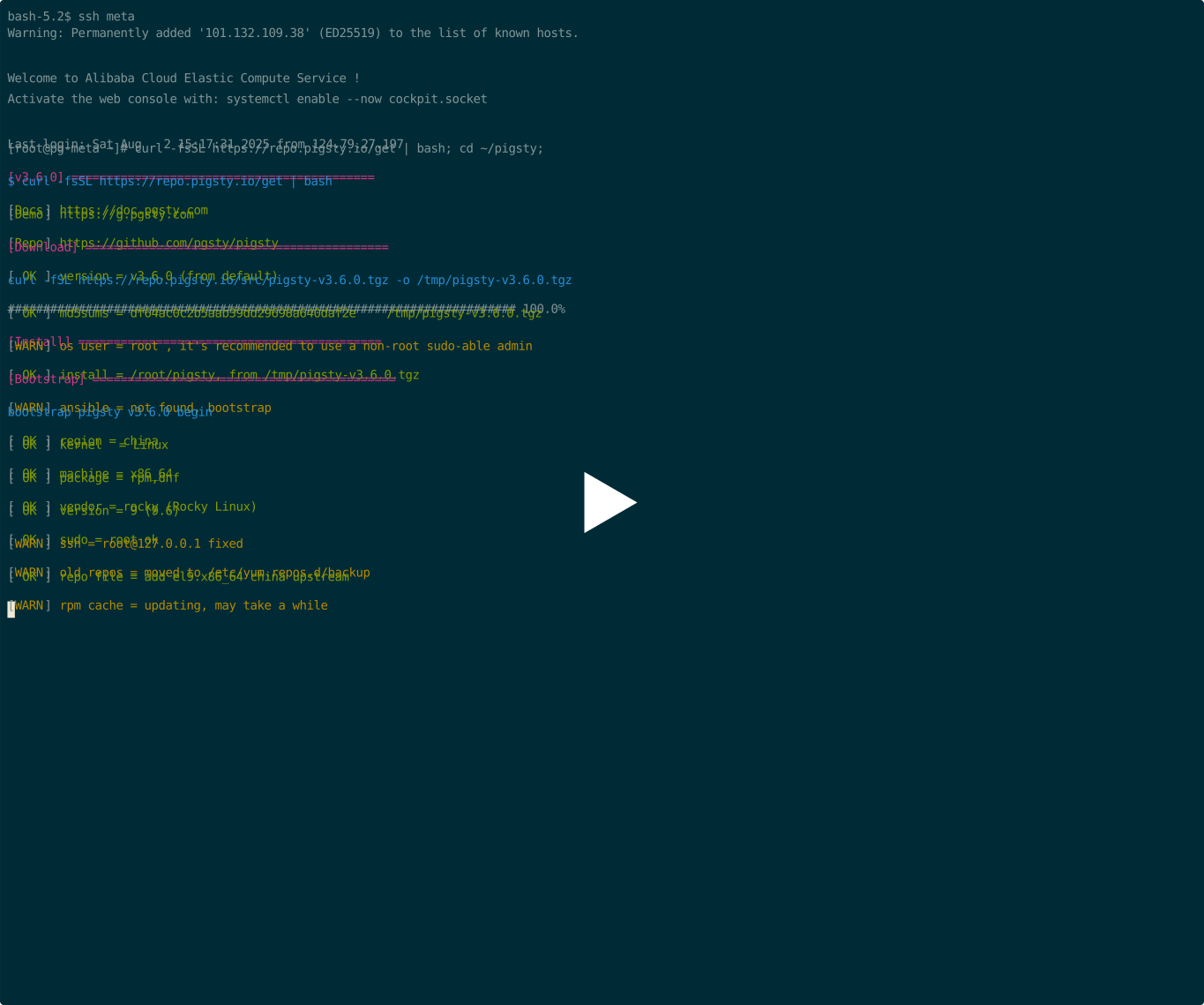
Prepare
Check Preparation for all the details, here's a quick summary:
| Item | Requirement | Item | Requirement |
|---|---|---|---|
| Node | 1C1G at least, 2C2G recommended | Spec | 1 node at least, 2 for semi-HA, 3+ for real HA |
| Disk | /data, main mount point, ext4/xfs | Network | static IPv4 address |
| VIP | Optional L2 VIP | Domain | Optional local / public domain names |
| Kernel | Linux | Distro | el8-10, d12/13, u22/24 x x86_64 / aarch64 |
| Locale | C.UTF-8 or C | Firewall | port: 80 / 443 / 22 / 5432 |
| User | avoid using root & postgres | Sudo | nopass sudo privilege |
| SSH | nopass via public key | Accessible | ssh <ip|alias> sudo ls without error |
Download
(RECOMMENDED) You can get & extract the latest stable version of pigsty source with:
curl -fsSL https://repo.pigsty.io/get | bash; cd ~/pigstycurl -fsSL https://repo.pigsty.cc/get | bash; cd ~/pigsty # china mirrorcurl -fsSL https://repo.pigsty.io/get | bash -s v3.7.0; cd ~/pigstyYou can also install via git, pig, or download source & offline package tarball directly from GitHub.
Configure
The configure script will generate the pigsty.yml config file inventory with good defaults according to your environment and input.
It's OPTIONAL, you can edit the pigsty.yml directly as the tutorial shows.
There are many Config Templates for your reference, here are some quick examples:
./configure                  # use the default template, PG 18 with essential extensions
./configure -v 17            # default meta template with PG 17 instead of 18
./configure -c rich          # PG 18, local repo, download all extensions and install major ones
./configure -c slim          # minimal installation template, use with ./slim.yml playbook
./configure -c app/supa      # use the app/supa self-hosting supabase config template
./configure -c ivory         # use the ivorysql kernel instead of vanilla PG (pg18.0)
./configure -i 10.11.12.13   # give primary IP address explicitly
./configure -r china         # use use china mirror instead of default repo
./configure -c full -s       # use the 4-node sandbox config template, without IP replace & probe
Let's just do configure without any args, it may ask you for the primary IP if more than one is found.
[vagrant@node-2 pigsty]$ ./configure
configure pigsty v3.7.0 begin
[ OK ] region  = default
[ OK ] kernel  = Linux
[ OK ] machine = x86_64
[ OK ] package = rpm,dnf
[ OK ] vendor  = rocky (Rocky Linux)
[ OK ] version = 9 (9.6)
[ OK ] sudo = vagrant ok
[ OK ] ssh = vagrant@127.0.0.1 ok
[WARN] Multiple IP address candidates found:
    (1) 192.168.121.24	inet 192.168.121.24/24 brd 192.168.121.255 scope global dynamic noprefixroute eth0
    (2) 10.10.10.12	    inet 10.10.10.12/24 brd 10.10.10.255 scope global noprefixroute eth1
[ IN ] INPUT primary_ip address (of current meta node, e.g 10.10.10.10):
=> 10.10.10.12    # <------- INPUT YOUR PRIMARY IPV4 ADDRESS HERE!
[ OK ] primary_ip = 10.10.10.12 (from input)
[ OK ] admin = vagrant@10.10.10.12 ok
[ OK ] mode = meta (el9)
[ OK ] locale  = C.UTF-8
[ OK ] configure pigsty done
proceed with ./install.yml
This script will replace the IP placeholder 10.10.10.10 to the primary IPv4 address of current node.
Beware of this when you are configure pigsty manually. Check the generated pigsty.yml to proceed.
HEY! Don't forget these passwords!
Change default passwords!
PLEASE CHANGE DEFAULT PASSWORDS in any serious deployment before install
Then change default passwords and make necessary adjustments, the final pigsty.yml may look like:
all:

  #==============================================================#
  # Clusters, Nodes, and Modules
  #==============================================================#
  children:

    #----------------------------------------------#
    # PGSQL : https://doc.pgsty.com/pgsql
    #----------------------------------------------#
    # this is an example single-node postgres cluster with pgvector installed, with one biz database & two biz users
    pg-meta:
      hosts:
        10.10.10.10: { pg_seq: 1, pg_role: primary } # <---- primary instance with read-write capability
        #x.xx.xx.xx: { pg_seq: 2, pg_role: replica } # <---- read only replica for read-only online traffic
        #x.xx.xx.xy: { pg_seq: 3, pg_role: offline } # <---- offline instance of ETL & interactive queries
      vars:
        pg_cluster: pg-meta

        # install, load, create pg extensions: https://doc.pgsty.com/pgsql/extension
        pg_extensions: [ postgis, pgvector ]

        # define business users/roles : https://doc.pgsty.com/pgsql/user
        pg_users:
          - { name: dbuser_meta ,password: DBUser.Meta   ,pgbouncer: true ,roles: [dbrole_admin   ] ,comment: pigsty admin user }
          - { name: dbuser_view ,password: DBUser.Viewer ,pgbouncer: true ,roles: [dbrole_readonly] ,comment: read-only viewer  }

        # define business databases : https://doc.pgsty.com/pgsql/db
        pg_databases:
          - name: meta
            baseline: cmdb.sql
            comment: "pigsty meta database"
            schemas: [pigsty]
            # define extensions in database : https://doc.pgsty.com/pgsql/extension/create
            extensions: [ postgis, vector ]

        # define HBA rules : https://doc.pgsty.com/pgsql/hba
        pg_hba_rules:
          - { user: dbuser_view , db: all ,addr: infra ,auth: pwd ,title: 'allow grafana dashboard access cmdb from infra nodes' }

        # define backup policies: https://doc.pgsty.com/pgsql/backup
        node_crontab: [ '00 01 * * * postgres /pg/bin/pg-backup full' ] # make a full backup every day 1am

        # define (OPTIONAL) L2 VIP that bind to primary
        #pg_vip_enabled: true
        #pg_vip_address: 10.10.10.2/24
        #pg_vip_interface: eth1


    #----------------------------------------------#
    # INFRA : https://doc.pgsty.com/infra
    #----------------------------------------------#
    infra:
      hosts:
        10.10.10.10: { infra_seq: 1 }
      vars:
        repo_enabled: false   # disable in 1-node mode :  https://doc.pgsty.com/admin/repo
        #repo_extra_packages: [ pg18-main ,pg18-time ,pg18-gis ,pg18-rag ,pg18-fts ,pg18-olap ,pg18-feat ,pg18-lang ,pg18-type ,pg18-util ,pg18-func ,pg18-admin ,pg18-stat ,pg18-sec ,pg18-fdw ,pg18-sim ,pg18-etl]

    #----------------------------------------------#
    # ETCD : https://doc.pgsty.com/etcd
    #----------------------------------------------#
    etcd:
      hosts:
        10.10.10.10: { etcd_seq: 1 }
      vars:
        etcd_cluster: etcd
        etcd_safeguard: false             # prevent purging running etcd instance?

    #----------------------------------------------#
    # MINIO : https://doc.pgsty.com/minio
    #----------------------------------------------#
    #minio:
    #  hosts:
    #    10.10.10.10: { minio_seq: 1 }
    #  vars:
    #    minio_cluster: minio
    #    minio_users:                      # list of minio user to be created
    #      - { access_key: pgbackrest  ,secret_key: S3User.Backup ,policy: pgsql }
    #      - { access_key: s3user_meta ,secret_key: S3User.Meta   ,policy: meta  }
    #      - { access_key: s3user_data ,secret_key: S3User.Data   ,policy: data  }

    #----------------------------------------------#
    # DOCKER : https://doc.pgsty.com/docker
    # APP    : https://doc.pgsty.com/app
    #----------------------------------------------#
    # launch example pgadmin app with: ./app.yml (http://10.10.10.10:8885 admin@pigsty.cc / pigsty)
    app:
      hosts: { 10.10.10.10: {} }
      vars:
        docker_enabled: true                # enabled docker with ./docker.yml
        docker_registry_mirrors: ["https://docker.1panel.live","https://docker.1ms.run","https://docker.xuanyuan.me","https://registry-1.docker.io"]
        app: pgadmin                        # specify the default app name to be installed (in the apps)
        apps:                               # define all applications, appname: definition
          pgadmin:                          # pgadmin app definition (app/pgadmin -> /opt/pgadmin)
            conf:                           # override /opt/pgadmin/.env
              PGADMIN_DEFAULT_EMAIL: admin@pigsty.cc
              PGADMIN_DEFAULT_PASSWORD: pigsty


  #==============================================================#
  # Global Parameters
  #==============================================================#
  vars:

    #----------------------------------------------#
    # INFRA : https://doc.pgsty.com/infra
    #----------------------------------------------#
    version: v3.7.0                   # pigsty version string
    admin_ip: 10.10.10.10             # admin node ip address
    region: china                     # upstream mirror region: default|china|europe
    proxy_env:                        # global proxy env when downloading packages
      no_proxy: "localhost,127.0.0.1,10.0.0.0/8,192.168.0.0/16,*.pigsty,*.aliyun.com,mirrors.*,*.myqcloud.com,*.tsinghua.edu.cn"
      # http_proxy:  # set your proxy here: e.g http://user:pass@proxy.xxx.com
      # https_proxy: # set your proxy here: e.g http://user:pass@proxy.xxx.com
      # all_proxy:   # set your proxy here: e.g http://user:pass@proxy.xxx.com
    infra_portal:                     # domain names and upstream servers
      home         : { domain: h.pigsty }
      grafana      : { domain: g.pigsty ,endpoint: "${admin_ip}:3000" , websocket: true }
      prometheus   : { domain: p.pigsty ,endpoint: "${admin_ip}:9058" }
      alertmanager : { domain: a.pigsty ,endpoint: "${admin_ip}:9059" }
      blackbox     : { endpoint: "${admin_ip}:9115" }
      loki         : { endpoint: "${admin_ip}:3100" }
      pgadmin      : { domain: adm.pigsty ,endpoint: "${admin_ip}:8885" }
      #minio       : { domain: m.pigsty ,endpoint: "${admin_ip}:9001" ,scheme: https ,websocket: true }

    #----------------------------------------------#
    # PASSWORD : https://doc.pgsty.com/config/security
    #----------------------------------------------#
    grafana_admin_password: pigsty               # <-------- CHANGE ME!
    pg_admin_password: DBUser.DBA                # <-------- CHANGE ME!
    pg_monitor_password: DBUser.Monitor          # <-------- CHANGE ME!
    pg_replication_password: DBUser.Replicator   # <-------- CHANGE ME!
    patroni_password: Patroni.API                # <-------- CHANGE ME!
    haproxy_admin_password: pigsty               # <-------- CHANGE ME!
    minio_secret_key: minioadmin                 # <-------- CHANGE ME!

    #----------------------------------------------#
    # NODE : https://doc.pgsty.com/node/param
    #----------------------------------------------#
    nodename_overwrite: false             # do not overwrite node hostname on single node mode
    node_tune: tiny                       # node tuning specs: oltp,olap,tiny,crit
    node_etc_hosts: [ '10.10.10.10 h.pigsty a.pigsty p.pigsty g.pigsty sss.pigsty' ]
    node_repo_modules: 'node,infra,pgsql' # add these repos directly to the singleton node
    #node_repo_modules: local             # use this if you want to build & user local repo
    node_repo_remove: true                # remove existing node repo for node managed by pigsty
    #node_packages: [openssh-server]      # packages to be installed current nodes with the latest version

    #----------------------------------------------#
    # PGSQL : https://doc.pgsty.com/pgsql/param
    #----------------------------------------------#
    pg_version: 18                      # default postgres version
    pg_locale: C.UTF-8                  # overwrite default C local
    pg_lc_collate: C.UTF-8              # overwrite default C lc_collate
    pg_lc_ctype: C.UTF-8                # overwrite default C lc_ctype

    pg_conf: tiny.yml                   # pgsql tuning specs: {oltp,olap,tiny,crit}.yml
    pg_safeguard: false                 # prevent purging running postgres instance?
    pg_packages: [ pgsql-main, pgsql-common ]                 # pg kernel and common utils
    #pg_extensions: [ pg18-time ,pg18-gis ,pg18-rag ,pg18-fts ,pg18-olap ,pg18-feat ,pg18-lang ,pg18-type ,pg18-util ,pg18-func ,pg18-admin ,pg18-stat ,pg18-sec ,pg18-fdw ,pg18-sim ,pg18-etl]
What if I want more Extensions?
Just uncomment the following two parameters in pigsty.yml to make it looks like:
    repo_extra_packages: [ pg17-main ,pg17-core ,pg17-time ,pg17-gis ,pg17-rag ,pg17-fts ,pg17-olap ,pg17-feat ,pg17-lang ,pg17-type ,pg17-util ,pg17-func ,pg17-admin ,pg17-stat ,pg17-sec ,pg17-fdw ,pg17-sim ,pg17-etl]
    pg_extensions: [pg17-time ,pg17-gis ,pg17-rag ,pg17-fts ,pg17-feat ,pg17-lang ,pg17-type ,pg17-util ,pg17-func ,pg17-admin ,pg17-stat ,pg17-sec ,pg17-fdw ,pg17-sim ,pg17-etl ] #,pg17-olap]
There are much more magic you can do with the config file, check the Configuration for details.
Install
Everything in Pigsty is described in config inventory: the pigsty.yml blueprint generated above.
Run the install.yml playbook to materialize it into reality.
./install.ymlIf you see something like pgsql init done or grafana datasource meta, PLAY RECAP or simlar stuff in the output, it means the installation is complete!
......

TASK [pgsql : pgsql init done] *************************************************
ok: [10.10.10.11] => {
    "msg": "postgres://10.10.10.11/postgres | meta  | dbuser_meta dbuser_view "
}
......

TASK [pg_monitor : load grafana datasource meta] *******************************
changed: [10.10.10.11]

PLAY RECAP *********************************************************************
10.10.10.11                : ok=302  changed=232  unreachable=0    failed=0    skipped=65   rescued=0    ignored=1
localhost                  : ok=6    changed=3    unreachable=0    failed=0    skipped=1    rescued=0    ignored=0
Sometimes upstream repo (like linux / pgdg repo) may break, this do happen from time to time, and led to installation failure. You can use pre-made offline packages to address this issue.
NEVER RUN THIS AGAIN ON EXISTING DEPLOYMENT!
Re-run this playbook entirely will nuke (wipe-out) the current deployment and create a new one!
If you have enough knowledge with ansible and know what you are doing, still do it with caution!
Once installed, you can explore the Interface and deploy More Nodes and more HA database clusters.
More
You can deploy & monitor More Clusters with pigsty: add definition to the Inventory and run:
bin/node-add pg-test    # init 3 nodes of cluster pg-test
bin/pgsql-add pg-test   # init HA PGSQL Cluster pg-test
bin/redis-add redis-ms  # init redis cluster redis-ms
Remember that most modules require the NODE module installed first. Check available modules for detail