快速上手
如何在您的 Linux 主机上安装 pigsty?
本文是 Pigsty 单节点安装指南,多节点安装 介绍了在生产环境进行真正高可用部署的方法。
简化版本
准备 一台具有 SSH权限 的 节点 并安装 兼容的Linux发行版,
使用带免密 ssh 和 sudo 权限的用户:
下载 pigsty,它会自动安装至 ~/pigsty 目录,并尝试安装 ansible:
curl -fsSL https://repo.pigsty.io/get | bash; cd ~/pigsty;使用 configure 生成配置文件,或直接根据您的需求调整 pigsty.yml:
./configure # 可以使用 -c [conf] 指定具体的配置模板使用 install.yml 剧本,一键 安装部署 所有组件:
./install.yml示例:在 RockyLinux 9 上的单机安装:
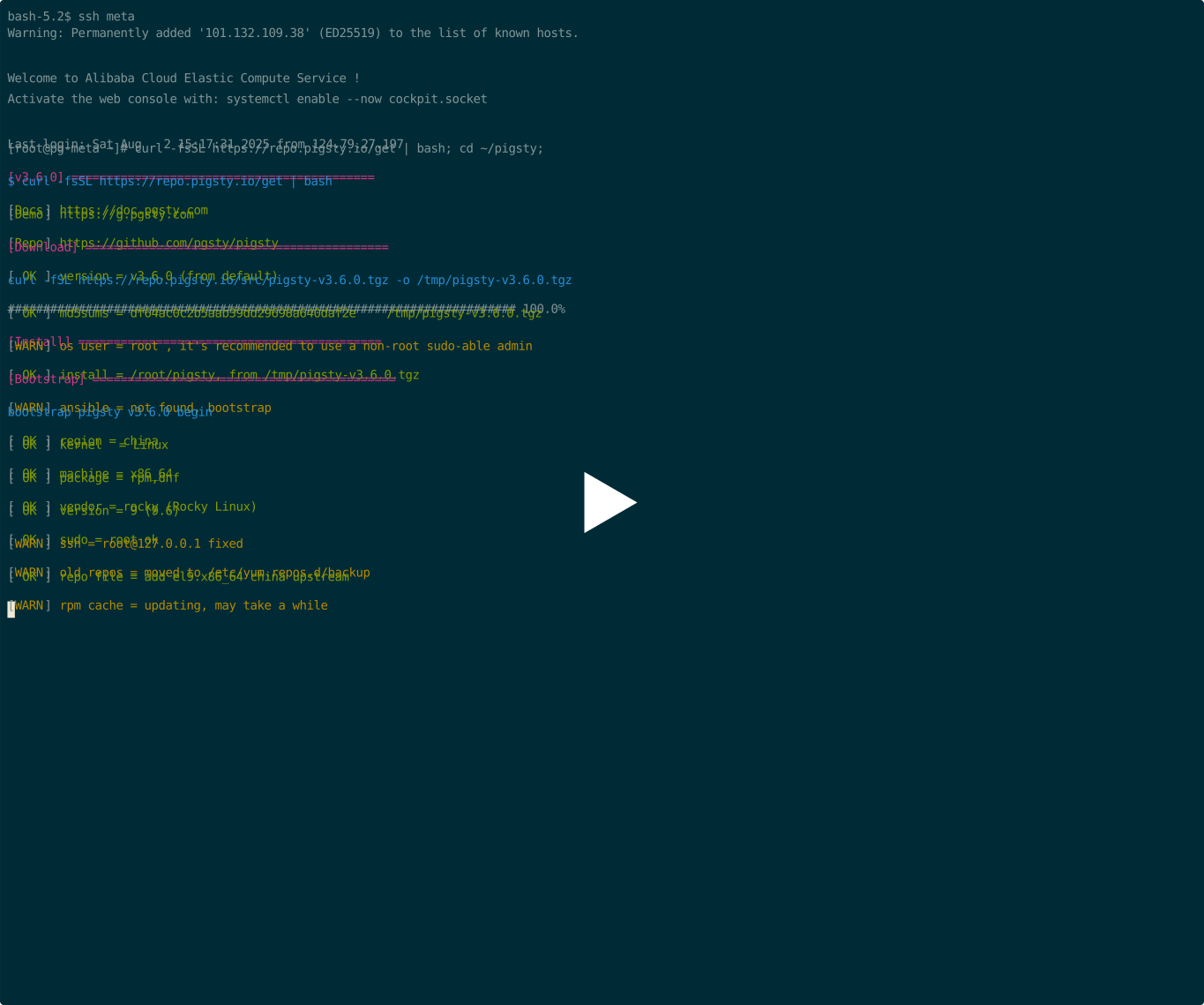
准备
安装 Pigsty 涉及一些 准备工作 ,以下是简略检查清单:
| 项目 | 要求 | 项目 | 要求 |
|---|---|---|---|
| 节点 | 至少 1C1G,推荐 2C2G | 规格 | 至少1个节点,2个为半高可用,3个以上真高可用 |
| 磁盘 | /data,主挂载点,ext4/xfs | 网络 | 静态 IPv4 地址,单节点可使用 127.0.0.1 |
| VIP | L2 VIP,可选 | 域名 | 本地/公网域名,可选 |
| 内核 | Linux | 发行版 | el8/9/10,d12/13, u22/u24 x x86_64 / aarch64 |
| Locale | C.UTF-8 或 C | 防火墙 | 端口:80 / 443 / 22 / 5432 |
| 用户 | 避免使用 root 和 postgres | Sudo | nopass sudo 权限 |
| SSH | 通过公钥 nopass | 可达性 | ssh <ip|alias> sudo ls 无错误 |
下载
(推荐)您可以使用以下命令获取并解压最新稳定版本的 pigsty 源码:
curl -fsSL https://repo.pigsty.io/get | bash; cd ~/pigstycurl -fsSL https://repo.pigsty.cc/get | bash; cd ~/pigsty # 中国镜像curl -fsSL https://repo.pigsty.io/get | bash -s v3.7.0; cd ~/pigsty您也可以通过 git、pig 或直接从 GitHub 下载源码 和 离线软件包 压缩包的方式安装。
配置
configure 脚本将根据您的环境和输入生成具有良好默认值的 pigsty.yml 配置文件 配置清单。
这是 可选的,您可以如 教程 所示直接编辑 pigsty.yml。
有许多 配置模板 供您参考,以下是一些快速示例:
./configure                  # 使用默认模板,安装默认的 PG 18,带有必要扩展
./configure -v 17            # 使用 PG 17 的版本,而非默认的 PG18
./configure -c rich          # 创建本地软件仓库,下载所有扩展,安装主要扩展
./configure -c slim          # 最小安装模板,与 ./slim.yml 剧本一起使用
./configure -c app/supa      # 使用 app/supa 自托管 supabase 配置模板
./configure -c ivory         # 使用 ivorysql 内核而非原生 PG
./configure -i 10.11.12.13   # 显式指定主 IP 地址
./configure -r china         # 使用中国镜像而非默认仓库
./configure -c full -s       # 使用 4 节点沙箱配置模板,不进行 IP 替换和探测
让我们不带任何参数执行 configure,如果发现多个 IP 地址,它可能会要求您输入主 IP 地址。
[vagrant@node-2 pigsty]$ ./configure
configure pigsty v3.6.0 begin
[ OK ] region  = default
[ OK ] kernel  = Linux
[ OK ] machine = x86_64
[ OK ] package = rpm,dnf
[ OK ] vendor  = rocky (Rocky Linux)
[ OK ] version = 9 (9.6)
[ OK ] sudo = vagrant ok
[ OK ] ssh = vagrant@127.0.0.1 ok
[WARN] Multiple IP address candidates found:
    (1) 192.168.121.24	inet 192.168.121.24/24 brd 192.168.121.255 scope global dynamic noprefixroute eth0
    (2) 10.10.10.12	    inet 10.10.10.12/24 brd 10.10.10.255 scope global noprefixroute eth1
[ IN ] INPUT primary_ip address (of current meta node, e.g 10.10.10.10):
=> 10.10.10.12    # <------- 在这里输入你的首要 IPv4 地址!
[ OK ] primary_ip = 10.10.10.12 (from input)
[ OK ] admin = vagrant@10.10.10.12 ok
[ OK ] mode = meta (el9)
[ OK ] locale  = C.UTF-8
[ OK ] configure pigsty done
proceed with ./install.yml
该脚本将把 IP 占位符 10.10.10.10 替换为当前节点的主 IPv4 地址。
在 手动 配置 pigsty 时请注意这一点。检查生成的 pigsty.yml 以继续。
嘿!别忘了这些密码!
然后修改默认 密码 并进行必要的调整,最终的 pigsty.yml 可能如下所示:
all:

  #==============================================================#
  # Clusters, Nodes, and Modules
  #==============================================================#
  children:

    #----------------------------------------------#
    # PGSQL : https://doc.pgsty.com/pgsql
    #----------------------------------------------#
    # this is an example single-node postgres cluster with pgvector installed, with one biz database & two biz users
    pg-meta:
      hosts:
        10.10.10.10: { pg_seq: 1, pg_role: primary } # <---- primary instance with read-write capability
        #x.xx.xx.xx: { pg_seq: 2, pg_role: replica } # <---- read only replica for read-only online traffic
        #x.xx.xx.xy: { pg_seq: 3, pg_role: offline } # <---- offline instance of ETL & interactive queries
      vars:
        pg_cluster: pg-meta

        # install, load, create pg extensions: https://doc.pgsty.com/pgsql/extension
        pg_extensions: [ postgis, pgvector ]

        # define business users/roles : https://doc.pgsty.com/pgsql/user
        pg_users:
          - { name: dbuser_meta ,password: DBUser.Meta   ,pgbouncer: true ,roles: [dbrole_admin   ] ,comment: pigsty admin user }
          - { name: dbuser_view ,password: DBUser.Viewer ,pgbouncer: true ,roles: [dbrole_readonly] ,comment: read-only viewer  }

        # define business databases : https://doc.pgsty.com/pgsql/db
        pg_databases:
          - name: meta
            baseline: cmdb.sql
            comment: "pigsty meta database"
            schemas: [pigsty]
            # define extensions in database : https://doc.pgsty.com/pgsql/extension/create
            extensions: [ postgis, vector ]

        # define HBA rules : https://doc.pgsty.com/pgsql/hba
        pg_hba_rules:
          - { user: dbuser_view , db: all ,addr: infra ,auth: pwd ,title: 'allow grafana dashboard access cmdb from infra nodes' }

        # define backup policies: https://doc.pgsty.com/pgsql/backup
        node_crontab: [ '00 01 * * * postgres /pg/bin/pg-backup full' ] # make a full backup every day 1am

        # define (OPTIONAL) L2 VIP that bind to primary
        #pg_vip_enabled: true
        #pg_vip_address: 10.10.10.2/24
        #pg_vip_interface: eth1


    #----------------------------------------------#
    # INFRA : https://doc.pgsty.com/infra
    #----------------------------------------------#
    infra:
      hosts:
        10.10.10.10: { infra_seq: 1 }
      vars:
        repo_enabled: false   # disable in 1-node mode :  https://doc.pgsty.com/admin/repo
        #repo_extra_packages: [ pg18-main ,pg18-time ,pg18-gis ,pg18-rag ,pg18-fts ,pg18-olap ,pg18-feat ,pg18-lang ,pg18-type ,pg18-util ,pg18-func ,pg18-admin ,pg18-stat ,pg18-sec ,pg18-fdw ,pg18-sim ,pg18-etl]

    #----------------------------------------------#
    # ETCD : https://doc.pgsty.com/etcd
    #----------------------------------------------#
    etcd:
      hosts:
        10.10.10.10: { etcd_seq: 1 }
      vars:
        etcd_cluster: etcd
        etcd_safeguard: false             # prevent purging running etcd instance?

    #----------------------------------------------#
    # MINIO : https://doc.pgsty.com/minio
    #----------------------------------------------#
    #minio:
    #  hosts:
    #    10.10.10.10: { minio_seq: 1 }
    #  vars:
    #    minio_cluster: minio
    #    minio_users:                      # list of minio user to be created
    #      - { access_key: pgbackrest  ,secret_key: S3User.Backup ,policy: pgsql }
    #      - { access_key: s3user_meta ,secret_key: S3User.Meta   ,policy: meta  }
    #      - { access_key: s3user_data ,secret_key: S3User.Data   ,policy: data  }

    #----------------------------------------------#
    # DOCKER : https://doc.pgsty.com/docker
    # APP    : https://doc.pgsty.com/app
    #----------------------------------------------#
    # launch example pgadmin app with: ./app.yml (http://10.10.10.10:8885 admin@pigsty.cc / pigsty)
    app:
      hosts: { 10.10.10.10: {} }
      vars:
        docker_enabled: true                # enabled docker with ./docker.yml
        docker_registry_mirrors: ["https://docker.1panel.live","https://docker.1ms.run","https://docker.xuanyuan.me","https://registry-1.docker.io"]
        app: pgadmin                        # specify the default app name to be installed (in the apps)
        apps:                               # define all applications, appname: definition
          pgadmin:                          # pgadmin app definition (app/pgadmin -> /opt/pgadmin)
            conf:                           # override /opt/pgadmin/.env
              PGADMIN_DEFAULT_EMAIL: admin@pigsty.cc
              PGADMIN_DEFAULT_PASSWORD: pigsty


  #==============================================================#
  # Global Parameters
  #==============================================================#
  vars:

    #----------------------------------------------#
    # INFRA : https://doc.pgsty.com/infra
    #----------------------------------------------#
    version: v3.7.0                   # pigsty version string
    admin_ip: 10.10.10.10             # admin node ip address
    region: china                     # upstream mirror region: default|china|europe
    proxy_env:                        # global proxy env when downloading packages
      no_proxy: "localhost,127.0.0.1,10.0.0.0/8,192.168.0.0/16,*.pigsty,*.aliyun.com,mirrors.*,*.myqcloud.com,*.tsinghua.edu.cn"
      # http_proxy:  # set your proxy here: e.g http://user:pass@proxy.xxx.com
      # https_proxy: # set your proxy here: e.g http://user:pass@proxy.xxx.com
      # all_proxy:   # set your proxy here: e.g http://user:pass@proxy.xxx.com
    infra_portal:                     # domain names and upstream servers
      home         : { domain: h.pigsty }
      grafana      : { domain: g.pigsty ,endpoint: "${admin_ip}:3000" , websocket: true }
      prometheus   : { domain: p.pigsty ,endpoint: "${admin_ip}:9058" }
      alertmanager : { domain: a.pigsty ,endpoint: "${admin_ip}:9059" }
      blackbox     : { endpoint: "${admin_ip}:9115" }
      loki         : { endpoint: "${admin_ip}:3100" }
      pgadmin      : { domain: adm.pigsty ,endpoint: "${admin_ip}:8885" }
      #minio       : { domain: m.pigsty ,endpoint: "${admin_ip}:9001" ,scheme: https ,websocket: true }

    #----------------------------------------------#
    # PASSWORD : https://doc.pgsty.com/config/security
    #----------------------------------------------#
    grafana_admin_password: pigsty               # <-------- CHANGE ME!
    pg_admin_password: DBUser.DBA                # <-------- CHANGE ME!
    pg_monitor_password: DBUser.Monitor          # <-------- CHANGE ME!
    pg_replication_password: DBUser.Replicator   # <-------- CHANGE ME!
    patroni_password: Patroni.API                # <-------- CHANGE ME!
    haproxy_admin_password: pigsty               # <-------- CHANGE ME!
    minio_secret_key: minioadmin                 # <-------- CHANGE ME!

    #----------------------------------------------#
    # NODE : https://doc.pgsty.com/node/param
    #----------------------------------------------#
    nodename_overwrite: false             # do not overwrite node hostname on single node mode
    node_tune: tiny                       # node tuning specs: oltp,olap,tiny,crit
    node_etc_hosts: [ '10.10.10.10 h.pigsty a.pigsty p.pigsty g.pigsty sss.pigsty' ]
    node_repo_modules: 'node,infra,pgsql' # add these repos directly to the singleton node
    #node_repo_modules: local             # use this if you want to build & user local repo
    node_repo_remove: true                # remove existing node repo for node managed by pigsty
    #node_packages: [openssh-server]      # packages to be installed current nodes with the latest version

    #----------------------------------------------#
    # PGSQL : https://doc.pgsty.com/pgsql/param
    #----------------------------------------------#
    pg_version: 18                      # default postgres version
    pg_locale: C.UTF-8                  # overwrite default C local
    pg_lc_collate: C.UTF-8              # overwrite default C lc_collate
    pg_lc_ctype: C.UTF-8                # overwrite default C lc_ctype

    pg_conf: tiny.yml                   # pgsql tuning specs: {oltp,olap,tiny,crit}.yml
    pg_safeguard: false                 # prevent purging running postgres instance?
    pg_packages: [ pgsql-main, pgsql-common ]                 # pg kernel and common utils
    #pg_extensions: [ pg18-time ,pg18-gis ,pg18-rag ,pg18-fts ,pg18-olap ,pg18-feat ,pg18-lang ,pg18-type ,pg18-util ,pg18-func ,pg18-admin ,pg18-stat ,pg18-sec ,pg18-fdw ,pg18-sim ,pg18-etl]
如果想要更多扩展怎么办?
只需在 pigsty.yml 中取消注释以下参数,使其看起来像这样:
pg_extensions: [ pg18-time ,pg18-gis ,pg18-rag ,pg18-fts ,pg18-olap ,pg18-feat ,pg18-lang ,pg18-type ,pg18-util ,pg18-func ,pg18-admin ,pg18-stat ,pg18-sec ,pg18-fdw ,pg18-sim ,pg18-etl]您可以用配置文件做更多神奇的事情,查看 配置 了解详情。
安装
Pigsty 中的一切都由 配置清单 所定义,也就是 上面 生成的 pigsty.yml 配置。
运行 install.yml 剧本 会实施这个部署计划。
./install.yml输出尾部如果带有 pgsql init done,PLAY RECAP 等字样,说明安装已经完成!
......

TASK [pgsql : pgsql init done] *************************************************
ok: [10.10.10.11] => {
    "msg": "postgres://10.10.10.11/postgres | meta  | dbuser_meta dbuser_view "
}
......

TASK [pg_monitor : load grafana datasource meta] *******************************
changed: [10.10.10.11]

PLAY RECAP *********************************************************************
10.10.10.11                : ok=302  changed=232  unreachable=0    failed=0    skipped=65   rescued=0    ignored=1
localhost                  : ok=6    changed=3    unreachable=0    failed=0    skipped=1    rescued=0    ignored=0
上游仓库(如 Linux / PGDG 仓库)可能会因为更新而进入崩溃状态并导致安装失败(有过多次先例)! 您可以选择等待上游仓库修复后安装,或者使用预制的 离线软件包 来解决这个问题。
不要在已经部署好的环境中重新运行 install.yml!
重新运行整个 install.yml 剧本将会覆盖式创建所有组件,有可能导致数据丢失和服务中断!
如果您熟悉 ansible 并清楚的知道自己在做什么,请谨慎使用。
安装完成后,您可以探索 用户界面,纳管 更多节点 并部署更多高可用数据库集群。
更多
您可以使用 pigsty 部署和监控 更多集群:向 配置清单 添加定义并运行:
bin/node-add pg-test    # 初始化集群 pg-test 的 3 个节点
bin/pgsql-add pg-test   # 初始化高可用 PGSQL 集群 pg-test
bin/redis-add redis-ms  # 初始化 redis 集群 redis-ms